
Scan and save
Capture receipt images, review the store, date, total, tax, and line items, then save everything in one place.
 SnapReceipts
Scan receipts, auto-read details with Smart scans, track spending, organize projects, build shopping lists, and export clean PDF reports.
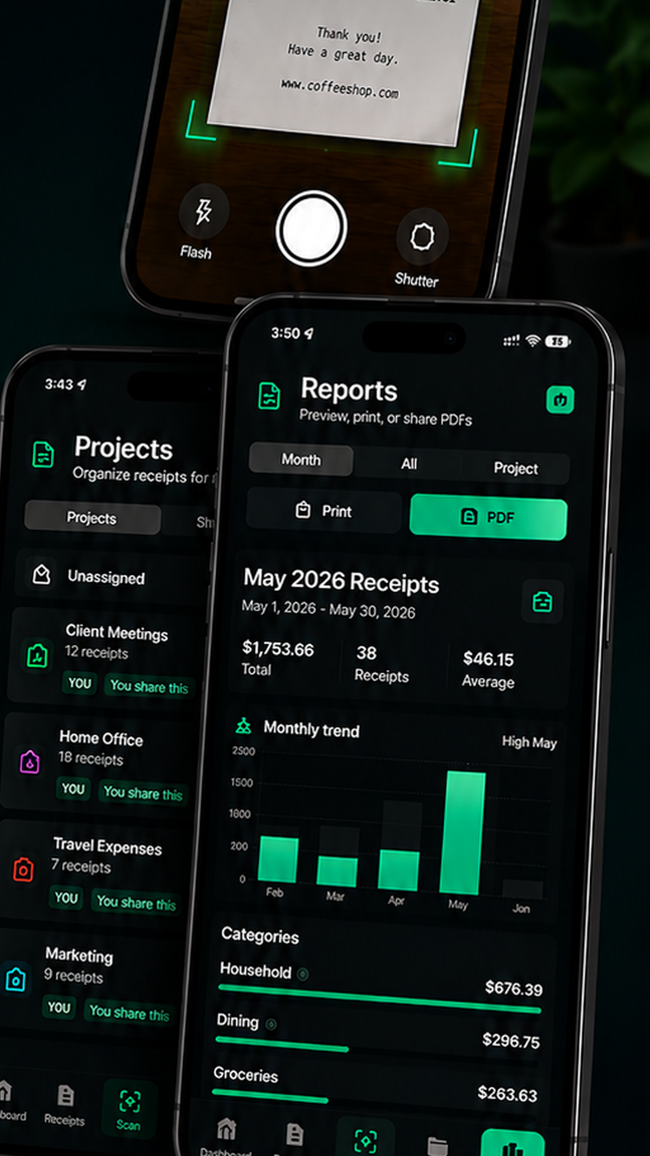
SnapReceipts keeps receipt details editable, organized, and ready for monthly tracking, tax prep, or project work.
Capture receipt images, review the store, date, total, tax, and line items, then save everything in one place.
See monthly totals, top stores, categories, and largest purchases without building a spreadsheet.
Create clean PDF summaries for projects, reimbursements, taxes, or personal record keeping.
Basic scanning is free. Optional Smart scans help auto-read receipt details faster, while every result stays editable before saving.
SnapReceipts reads the visible receipt text on your iPhone.
Check store, date, total, category, project, and line items before saving.
Attach receipts to projects, view spending, or export a PDF when you need it.
Build project reports, share shopping lists, and keep personal receipts backed up when iCloud is available.
Quick answers for scanning, Smart scans, subscriptions, sharing, and account recovery.
Yes. You can scan and save receipts for free. Smart scans are optional and help auto-read receipt details faster.
Smart scans use OCR text to suggest receipt details like store, date, total, tax, and line items. Receipt images are not sent to the Smart Parser.
Yes. SnapReceipts supports shared shopping lists and project collaboration through invite links.
Email abasawers@gmail.com or visit the support page for account, purchases, and data requests.
Launch with a cleaner way to scan, organize, and understand every receipt.